Most practice dashboards fail the same way. They are built by asking what can be shown, so they end up showing everything, and a screen with thirty numbers on it is read carefully for a week and ignored forever after.
A better question is who is looking, when, and what they might do about it. That question produces a much shorter screen, and a short screen is the only kind that stays in use. This article is about what survives that test.
The one test for every number
Would someone do something differently in the next hour because of this?
If the answer is no, the number is a report. Reports are valuable and they belong somewhere you go deliberately, once a week, with a coffee. A dashboard is somewhere you glance at between patients, and glancing has a budget of about four seconds.
Apply the test honestly and most candidates fail. Year-to-date production fails: nobody changes their afternoon because of it. Collections percentage fails. New patient count this month fails. All three matter enormously and none of them is a dashboard item.
What passes tends to be about right now, or about the next few hours.
The three horizons
The cleanest way to organize a practice’s screens is by how far ahead they look, because the three horizons have different readers and different rhythms.
Today, right now
This is the operational screen, the one the front desk keeps open. It should answer four questions with no clicking.
- Which rooms are free. Not booked. Free, reset and usable.
- Which rooms are running behind, and by how many minutes past the time the appointment was booked to end.
- How many people are waiting, and how long the longest wait is.
- Which rooms are being turned over, so nobody promises a chair with ten minutes of work left in it.
Four answers. Everything else on this screen is decoration, and the decoration is what makes people stop reading it.
Yesterday, and the last thirty days
This is the management screen, read weekly rather than hourly. It is where the operational questions become patterns.
- Utilization by operatory, not the practice average. The room-by-room figure is where the surprises are.
- Turnaround by hour of the day. Turnover that doubles at eleven is a cover problem at eleven.
- On-time starts, morning against afternoon.
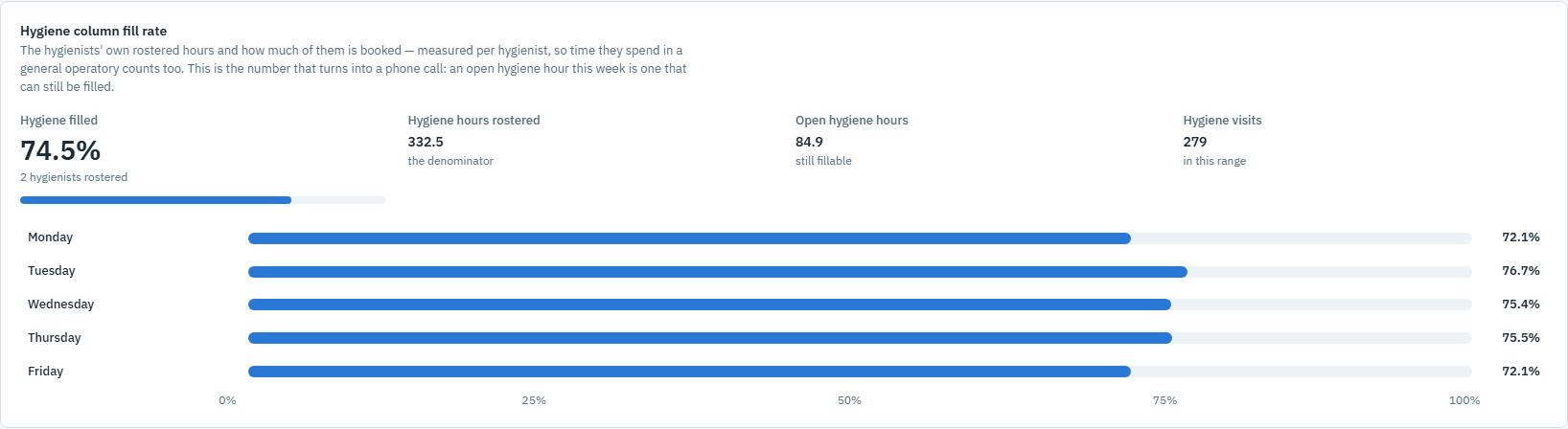
- Dead time by day and hour, which is the capacity you already own and have not sold.
- Where the chair hours actually went, by provider and by procedure.
Tomorrow, and this morning’s huddle
This is the smallest screen and the most underrated. A morning huddle held around a printed schedule is a reading exercise. A huddle held around three or four projections is a conversation.
- Today’s appointment count and booked chair hours, against a normal day.
- First and last appointment times per provider, which is who can absorb an emergency.
- Where today is likely to run over, by procedure, based on how those procedures have actually run in this practice rather than how long they are booked for.
- Which rooms are soft today, which is where a same-day call gets offered.
That last pair is the difference between a huddle that reviews the schedule and one that changes it.
What to leave off, and why
Anything clinical. A dashboard is a screen in a shared space, seen by people walking past it. Room, provider, procedure and timing are operational facts. Conditions, medications, allergies and notes are not, and they have no business on a screen anybody can see from six feet away.
Full patient names. A first name and a last initial is enough for the team to know who is in OP-3 and much less than a stranger needs to identify somebody. This is a small design decision that costs nothing and removes an entire category of problem.
Money, on the operational screen. Production per chair hour is a genuinely useful management figure and it belongs on the weekly screen, where the person reading it is deciding something. On the live screen it is either ignored or, worse, read by a patient walking past.
Anything that requires interpretation. If a number needs a sentence of explanation every time somebody looks at it, it is not a dashboard item yet. Either define it more sharply or move it to the weekly review.
Dashboard, or operational screen?
The word dashboard has drifted. In most dental software it means a summary page: totals, month to date, a few charts, refreshed when you open it. That is a reporting page, and it is fine.
What a practice usually wants when it says dashboard is different. It wants an operational screen: current, unprompted, updating on its own, and readable in four seconds from across a room. The distinction matters because the two have opposite design rules. A reporting page can be dense, because you sit down with it. An operational screen must be sparse, because you do not.
The practical consequence is that you probably need both, and you should stop trying to make one screen do both jobs. That is the reason so many practices have a summary page nobody has opened since the second week.
Getting the live half without a data entry job
The weekly screen can be built from your schedule with a spreadsheet and an afternoon, and it is worth doing by hand once so you know what the numbers mean.
The live half is the harder one, for one reason: it is only true if nothing on it is typed. A screen that needs a click during a busy afternoon is accurate at nine and wrong by three, and wrong by three is worse than absent, because everyone believed it at nine.
So the current state has to come from the appointment record the team is already keeping. OperatoryView reads Open Dental through Open Dental’s API, read-only, a few times a minute, and draws all three horizons: rooms live on the Board, arranged like your office, the analytics from today back to the last twelve months, and a morning huddle page projected from what has actually happened in your practice.
See each of the three screens, read what data reaches us and what does not, or explore the features.
See your Open Dental practice live.
Put every operatory on the Board on every office PC, message a room from a right-click, and measure what actually happened.